
Connecting Follow Up Boss (2-Way Sync)
Sync leads between AgentLoft and Follow Up Boss so every lead your website captures lands in your CRM automatically — and engagement flows both ways.
Before you start: The account owner must complete the API integration, and the primary manager needs to be a user within the Follow Up Boss account for the embedded app to work.
Where each piece goes: - The FUB API key gets pasted under the Integrations tab in AgentLoft. - The FUB Pixel gets pasted in the Custom Snippets section in AgentLoft.
Step 1 — Create a Follow Up Boss API key
- In Follow Up Boss, go to Admin → More → API.
- Click Create API Key and label it "AgentLoft."
- Copy the generated API key.
Step 2 — Connect the key in AgentLoft
- In AgentLoft, go to Settings (gear icon) → Integrations and paste the API key to complete the sync.
Step 3 — Set up FUB Pixel tracking
- Copy the FUB Pixel code from Follow Up Boss.
-
In AgentLoft, go to Settings (gear icon) → Custom Snippets.
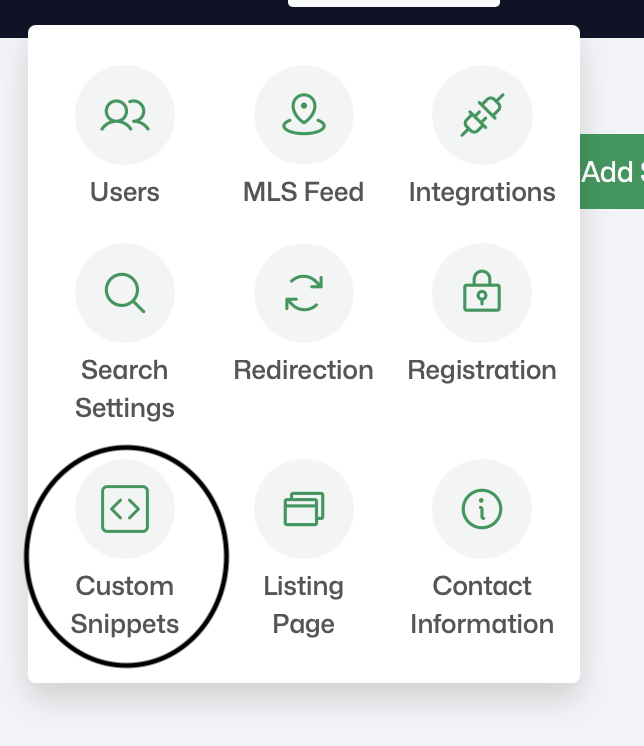 Settings menu — Custom Snippets option
 -
Create a custom snippet, set the Snippet Position to Inside
<head>, and paste the FUB Pixel code into it to complete tracking setup.
 Settings menu — Custom Snippets option
With the pixel in place, website activity ties back to the right person in Follow Up Boss, powering engagement signals and hot-lead alerts.
Related articles
- Embedding AgentLoft inside Follow Up Boss
- Adding Facebook Pixel and custom code snippets
Need help? Email support@agentloft.com.